When Steve Jobs unveiled the Macintosh 30 years ago — or, perhaps, should I say the Macintosh introduced itself — the world was a different place. No one in the audience was carrying a phone in their pocket, and few in attendance likely used a computer daily. There was no internet as we know it today, no live tweeting of the keynote. Photos of the event were shot on film, and Jobs himself likely listened to music on a cassette tape on the way home.
It was a different world.
Bill Gates’ stated dream of “a computer on every desk and in every home” was still a dream, a seemingly far-fetched one at that. And he, along with IBM and the rest of the industry, was dreaming of that in terms of DOS PCs on every desk.
So Steve Jobs and the incredible Macintosh team shipped a computer that could introduce itself, one that could be a canvas for artists, a bicycle for the mind.
The Mac has never taken over PC sales in marketshare. But most popular? That’d be easy to argue. They — along with the NeXT computers that formed the foundation for today’s Macs — have always been the aspirational machines that you aspired to own, that other tech companies aspired to copy.
***
I’ve a confession to make: I’ve only been using a Mac for three years now. It’s strange to say, perhaps, since my day job was being the editor of Mac.AppStorm for the past two years, writing about the latest and greatest Mac apps from a relatively shorter perspective than many. My first Mac was a 2011 Mac Mini, followed the next year by a mid-2012 MacBook Air — the Mac that’s still my work machine today. And yet, that was far from my first experience with Apple’s products.
The first memory I have of Apple would be of an aging Apple repair center in my hometown of Knoxville, Tennessee, with a fading classic rainbow Apple logo. That, along with grocery store banners about donating “Apples for Students”, was the only Jobs influence I can remember for the first 10 years of my life. My dad had an Amiga, which I can remember having to swap floppies while it was booting, and playing Marble Madness and some basketball game. That was followed by a Windows ’95 PC, with a stack of floppies to install Office, and an Aol. internet connection that proved more trouble than it was worth. Personal computers were too much trouble — heavy and cumbersome — and seemed far more at home at Dad’s office.
When I was 10, though, I remember our neighbor had an original bondi blue iMac, and that computer fascinated me. I never used it, but who wouldn’t be interested in a translucent, colorful computer that was easily portable? And then, a few years later, my grandfather got an iMac G4 — the most stunning Mac ever, in my opinion. It was simply incredible that the Mac could be that much nicer than any PC.
In the mean time, though, I’d gotten my own hands-on experience with some of Apple’s magic, by means of a Newton Messagepad 2000 my uncle gave me in, incidentally, 2000. That little machine wasn’t the most useful, perhaps, but I kept a journal on it, learned to write in Graffiti, and discovered the tiny touches I’d see again later on the Mac and in iOS — the poof of smoke when you erase something, just as you see when you drag a file off your dock on your Mac, and the suck-into-trashcan animation that was standard in Mail and Notes through iOS 6.
My first computer of my own was a Compaq LTE laptop, which I used to type papers in Word through 2007 when I finally purchased my own PC — a custom-built PC for $500 with a student-discount copy of Windows Vista and Office 2007. Vista didn’t give me as many headaches as most people complained about, but it also didn’t give me anything to be that excited about. Microsoft had hyped Vista as much as possible, and yet, when all was said and done, there was still next-to-no new indie software on Windows. I’d envy Notational Velocity and Keynote, Quicksilver and Marsedit and Writeroom — there was always new software to be excited about, but it was always on the Mac, not the PC.
And so, my original dream of buying a Mac lingered. College finances didn’t permit it, so I’d play with Linux, tweaking it to look like a Mac — but that was never as fun, and there still weren’t exciting new indie apps there, either. I was likely one of the very few users of Safari for PCs, just because it brought the Mac look and feel to a little corner of my PC. And that only increased my Mac envy, with its classic Mac-style slide-out dialogs and auto-resizing settings window. I’d read everything on Folklore.org, watch Steve Jobs keynotes, and attempt to Hackintosh my PC despite my hardware being wildly unsupported. And finally, when I figured out I could get OS X to run fine — if somewhat slow — in VirtualBox, I was hooked. I, at long last, had Notational Velocity, and Spotlight search, and Helvetica.
Along the way, I picked up a 3rd Gen iPod Touch, won an iPad 1 (which held me off from buying a MacBook right off, since I used it as my on-the-go computer for my last year of college), switched to an Apple wireless keyboard (yes, on the PC), and finally bought my first Mac Mini. It was, in true form, the perfect switcher’s Mac, since it worked with my existing monitor and carried a price tag that was easier to justify.
After years of flakey sound, driver errors, dead video cards, annual DVD drive replacements, and countless lost hours to updates, the Mac really did just work. Installing a program took one click, not a mirage of confusing dialogs. Sleep mode actually worked. The little things — the beautiful selection of fonts, the copy of “Here’s to the Crazy Ones” on TextEdit’s icon, the text editing keyboard shortcuts, the ubiquitous spell check and dictionary, the text substitutions and transformations, the power of Spotlight and its built-in calculator and Quick Look — themselves made the Mac so much better than any PC, it’d be impossible to imagine using anything else. I mean, the Mac could read Thai out loud, of all things. It was incredible.
Apple isn’t perfect, and neither are their products. It’s insane, perhaps, to wax poetic about a corporation’s products. And yet, the Mac, with its deep hardware and software integration and dozens of tiny things that truly make your life and work better, is something it’s easy to get attached to. I only wish I’d switched sooner.
***
When Steve Jobs came back to Apple, ushering in Apple’s new age by, incidentally, killing off the very machine that introduced me to Apple, the company’s future was far from certain. He cut to the bone, trimmed Apple’s product lineup, and focused resources on the design-led iMac. At the same time, he commissioned a new ad campaign: the “Think Different” campaign with its “Here’s to the Crazy Ones” commercials — ones that were originally to be narrated by Jobs himself. They defined Apple as the company that made machines for the thinkers and changers, the scientists and artists and musicians and leaders that make our world great. At its close, it said:
“While some see them as the crazy ones, we see genius. Because the people who are crazy enough to think they can change the world, are the ones who do.”
And that was Steve Jobs and the Macintosh team. They were crazy enough to think their little computer could change the world. 30 years later, I happen to think they were right, and am rather glad they were crazy enough to think outside the beige box.
It's a Post PC world, and we're just living in it. But for now, you still need a keyboard.
Steve Jobs told us that PCs are the new trucks, and tablets are the new cars. We all need a car — assuming we can't simply rely on public transit (hmm, could smartphones be the new public transit?) — but most of us don't need a truck. Oh, you might want a truck when you're at Ikea and feel like a fool having to stuff oversized boxes into your subcompact car, but you don't really need one. Or if you do, you simply couldn't get by with just a car. Case closed.
With computers, though, the case isn't exactly closed. Actually, turn that around: it's far from closed. Our smartphones are more powerful than the computers that took mankind to the moon, and yet most of us couldn't do a full day's work from an iPhone. At the very least, we wouldn't be very productive. And even on a tablet, you'd likely be hard pressed to get a day's work done, no matter how basic your computer job is.
Own just a car, and you can still get around perfectly fine — and even buy smaller furniture and just about anything else. Own just an iPad, though, and you'll feel technologically crippled.
But it doesn't have to be that way. Actually, all you need to add is a keyboard, and your tablet will be a lot closer to a computer substitute, just smaller and lighter.
Hello from 1868.
The keyboard is an odd part of life. Pencils and pens, even paintbrushes and markers, are simple enough that practically any early human civilization could have though of them. Keyboards, though, are a decidedly modern invention. The Qwerty keyboard we know (but may or may not love) was patented in 1868 by one Christopher Latham Sholes, a newspaper editor and, in his own way, tech entrepreneur. Smithsonian Magazine dug into the history of the Qwerty keyboard layout and Sholes' work, and found that it was due to both a deal to license the patent to Remington (the company today known as a gun manufacturer) for its typewriters, and due to the way telegraph operators used keyboards, that the layout became standard.
Thanks to the original short message service, and industrial age standards development processes, the Qwerty keyboard layout graces everything from now-antique typewriters to the on-screen keyboard in the latest smartphones. We may have switched to touchscreens, but we're still typing the same way we have for the past century and a half.
But that's not the power of the keyboard I'm talking about. Sure, being able to type letters and numbers and symbols on the iPad is important — but you don't need anything extra for that. What's needed, though, is the extra function keys we know and love from Mac and PC keyboards, and the extra features they can unlock on your iPad.
See, iOS is at its core essentially a lite version of OS X. And all the keyboard shortcuts you're used to using when editing text on a Mac are still baked into the OS. There's just no way to access most of them from your on-screen keyboard. You can long-tap on a key to get alternate versions of the letter or symbol, which is nice, but there's no way to select text, one word at a time, or jump to the top of a page, or insert an Apple icon, or add a non-breaking space character to your document. The iOS onscreen keyboard is best-in-class — I've written thousands of words on it — but it'll never rival a full keyboard unless it gets function keys. For that and more, you need an external keyboard.
The Power of a Keyboard
You'll need to get a keyboard to see what I'm meaning. There's a lot of options, from keyboard cases to an existing bluetooth powered keyboard you may have laying around. Any would work, but I suggest the Apple Wireless Keyboard, which at $69 is neither the cheapest or the most expensive option. But, it's a great keyboard in its own right, is light on batteries, and has all the functions you need to make your iPad into a nearly full computer.
Now, pair it with your iPad — or iPhone, if you don't mind working on a small screen — and open a new document in Pages (still unrivaled as the most powerful traditional word processor on the iPad). If you don't have it, open your favorite text editor app, or even the default Notes app. Type a few paragraphs — you'll likely type noticeably faster than you do on-screen — and try moving around through your text. Nice, right? Your iPad likely feels more powerful already.
Ok. Time to do more. Try selecting text (for those unused to editing text on OS X: hold shift while using your arrow keys, press alt as well to select text a word at a time, or press command at the same time to select to the end of the line, or the top/bottom of the page). Use CMD+C/X/V to copy/cut/paste text, or CMD+B/I to make text bold or italicized. You can even add in special characters with the same keyboard shortcuts you would on a Mac, so if you're learning to use better typography from Matthew Butterick's new book, you'll be able to insert non-breaking spaces and em dashes and more from your iPad. You'll suddenly find that there's no reason to fire up a computer for word processing anymore.
That's not all. Notice the tab key on your keyboard? That still works on your iPad. You can tab through online forms — or cells in Numbers spreadsheets — just like you would on a computer. Sure, it's not quite as useful since you can't CMD+tab between apps, or CMD+Q to quit an app, or use Spotlight to launch an app without touching the screen, but you can do far more with an external keyboard than you can without.
I used to use an iPad 1 as my full travel computer, working a full day of tech support and editing and email on the go. I could do it just from the on-screen keyboard — and multitasking gestures — but it'd be tiring. With a wireless keyboard, though, there's little left to miss from the Mac experience.
Now if there was just a way to install new fonts systemwide — or even in all individual apps, or perhaps just in Pages — on the iPad. Someday, perhaps. Someday.
Update: As it turns out, there is a way to install fonts systemwide in iOS 7. That was still months away, though, when this article was first written.
Originally published on July 29th, 2013 in Techinch Magazine Issue 3
Don't let notifications rule your life. Rule them instead.
It used to be the phone, ringing when people needed you. That was replaced with the vibrant Nokia jingle following you wherever you went, and Aol. letting you know that "You've got mail!" Then, it was the blinking LED on a Blackberry, or the faint buzz in your pocket, letting you now know whenever an email or call came in. Now, it's the ding-a-ling of iPhone notifications, ever-present every waking (and sleeping) moment, reminding us of every tiny bit of info in the world around us. Angry Birds wants you to get your reward of the day, some country you've never heard of just elected a new president, there are 15 new emails advertising products you don’t need, and that group texting app won't stop letting you know that all of your friends have way too much free time to waste chatting.
It's way too much. There's so much noise. You can't even find the info you actually need amongst all the unimportant notifications. Something's got to go.
So we turn on Do Not Disturb mode at night, put our phones on vibrate during the day, and get used to seeing red bullets with 3 digit numbers in the top corner of our app icons. Now we have a new chore: clearing out Notification Center, or trying hard to ignore it altogether
But notifications have a purpose, obviously: giving you instant access to the info you really need to know. That'd be great, if our devices were truly smart enough to filter out the junk and only send us what we really need. Instead, you have to do the filtering yourself — just once. After that, you'll find that notifications can actually be useful again.
Nixing Nonsense Notifications
First Law of Mobile Device Use: Never allow a new app to send you notifications, unless you know you want that app to notify you.
You know the routine: download a new app, open it, and it asks you to allow notifications, let the app access your pictures, and then asks you to rate the app before you've even had the chance to try it out. So we tap Ok, Ok, and, um, No thanks without even thinking. Yay, shiny new app!
Wait: there's the problem. The game you just downloaded likely has no real reason to send you push notifications. You never need to be interrupted during a meeting — or while you're trying to fall asleep — to be told that your crops are dying, or your birds want to kill pigs. You likely don't even need most of the notifications from your social networking apps, really. 99.9% of the time, you shouldn't allow notifications right off the bat. If you really like an app and decide you do want it to send you notifications, you can always go enable them. That makes far more sense than approving everything, only to have to turn it off later.
Once you've got that rule down, you're on the road to recovery, but you're not done yet. You still need to turn off the notifications for everything you've already enabled before, that you don't want to bug you now. So head to your settings, and turn off the notifications on everything you don't really think needs to notify you. Think it through, but most of the stuff there really doesn't have info that's so pressing and urgent it has to notify you. So take the nuclear option, and turn off all notifications from most of the apps. I'm sure you won't miss most of them — and you can always reenable them if you decide later that you really want notifications. The same options are there in iOS, OS X, Windows 8, and Android (though in Android, you'll have to turn off notifications in each app's settings), in order to get all of your devices to be quieter.
It's not just push notifications, though, that are the problem. You've got to stop getting so many emails, too. So when you sign up for a new account online, don't check the box saying you want emails from them, unless you really want to get emails from them. And whenever you see another ad you'd rather ignore in your Inbox, take the second to scroll to the bottom and click Unsubscribe. It'll take 20 seconds, and likely get you one last goodbye email, but you'll quit getting the same ignorable emails every single day. That should take away a good majority of the rest of your annoying notifications.
Is your phone still buzzing? No? Ok, good.
Stay Informed With the Stuff You Want
Remember when I said that notifications have a purpose? They still do, even if you just turned off every last notification from your phone and tablet and computer. Now, though, you've got to coax the ones you really want back.
Start by thinking through what you really want notified about. I'm sure you want to get the text messages from your closest friends and family, and likely want to get a notification if your boss sends you an urgent email. You might even like to get a notification if world war broke out, or if your favorite team won a game, or if your stocks dropped by a certain amount. You likely don't need a notification if someone liked your picture on Facebook, but you might like to get a notification if you got a private message on Facebook.
Now you've got options to make notifications work for you. You can turn back on notifications for the few apps you really want to let you know stuff, and tweak those to only send you the most urgent notifications you really want. Your email app can be set to only show notifications when you get emails from your "VIP" contacts; add the most important people in your address book to that list, and you'll only get important email notifications. Facebook and most chat apps like Line and WhatsApp, have similar settings, where you can fine-tune the notifications you get. I've turned off notifications from a group chat in Line, since none of the messages there are absolutely urgent, but left on normal individual message notifications so people can get ahold of me with Line. Twitter and App.net apps only notify me when I get direct messages; otherwise, any @replies aren't typically urgent enough to need me to check them right away. You can even add contacts to your "favorite" list, and set your phone to only ring when favorites call while the Do Not Disturb mode is on. You'll feel at ease turning off the rest of your notifications, knowing your family can still get in touch.
Now that your communications notifications are manageable, you can start adding in the other stuff you want to hear about: breaking news, major events, and such. But turning on bulk notifications from your favorite news app likely won't do the trick. Instead, you'll need to turn to IFTTT — as discussed in Issue 2 — to get the notifications you really want. You can start a new recipe there that'll send you a text — or perhaps a Boxcar notification, if you prefer — whenever there's a new news headline about the topic you're interested in, or when a certain stock drops below a number you set, or when your favorite team wins a game. You can even let it make you smarter, by letting you know when something you want to buy is on Craigslist, or when the forecast says it's going to rain, and more. You're going to get notifications, but this time, it's notifications you really want. And you can set this all up from your phone, and edit it anytime to cut out the noise if you're getting too many notifications, using the IFTTT iPhone app.
That's still likely going to make you miss out on some stuff, so if you really want to know what's going on in the world, you might want to add a news app that's not too chatty, and let it send you notifications. I keep the New York Times — my newspaper of choice — Newsstand app installed, with notifications enabled, and it typically only sends notifications about news that's important enough you'd want to hear about. That works well for me.
Notification Overload, Begone
“The condition upon which God hath given liberty to man is eternal vigilance”
Staying free of notification overload isn't anywhere near as important as liberty and freedom — but it'll still take eternal vigilance. You'll have to stay on top of your notifications to make sure they don't start overwhelming you again.
But it's worth it. So start by not enabling notifications for every app that comes along, and take the time to tweak your notifications so you'll only get the most important stuff. You might find that you actually like your iPhone's ding-a-ling sound again.
No, you'll likely rediscover the bliss of quietness. And that's better.
Originally published on July 29th, 2013 in Techinch Magazine Issue 3
For years now, I’ve reviewed apps for a living, saving my mini-tutorials, tips and tricks, opinion pieces on tech and life, and more for Techinch.com. There’s been the occasional review from time to time, but they’ve been rather rare over the past year or so.
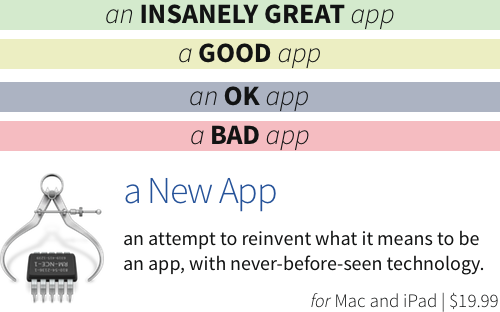
That’s changing. Now that AppStorm’s closing down, and my day job has been refocused to app training at Tuts+ — something you’ll see shared here too, soon — I want to continue reviewing the apps I love and use, and Techinch is the natural place to keep that going. So now, there’s a brand new Reviews section that’ll list each of my new app reviews, along with a new Kirby-powered review system that’ll include a quick rating and app info section at the end of each review. You’ll see a colored review bar (only one, of course, per app) followed by the app info, as seen below:
And, you’ll be able to spot Review articles from the main blog easily, since their titles will include a ∴ sign in front of them. Link articles already include an → before their title, to indicate that they link to another site, and reviews now include a ∴ since they include a conclusion telling you whether or not you should buy the app. Perhaps the icon isn’t perfect, but I thought it fit, and I wanted some way to set aside app reviews from the rest of the articles here.
Along with that, I’ve made a few long-needed code changes to make Techinch.com fully responsive, so it should look great everywhere. Let me know if you notice anything broken.
What to Expect from Techinch Reviews
A good review is far more than a shiny summary box, though. And if it only tells you that you can install the app and that it has all the features you’d expect and blah, blah, blah…, you’d fall asleep.
Here’s what you will find, though. Reviews at Techinch will tell you what’s great about an app, what problems it’ll solve in your life, and what (if any) issues you can expect from the app. You can expect geeky details like the fonts the app uses, and Applescript or x-callback-url features it has, and deep details on how the app works. Think AnandTech’s hardware reviews, except about apps. There will be none of the stuff you already should know about the app, and all of the stuff you’re curious about the app. It’ll be the detailed analysis you need to decide if you can really use the app in your workflow, along with full-sized clear screenshots of the app in action so you can see how it really works.
Then, there will be no number ratings on Techinch — the metadata in the reviews doesn’t even have a number — but there’s still a ranking system. Here’s how that breaks down:
INSANELY GREAT (green): Apps that do everything they’ve promised, and more, in such a great/new/innovative way that you can’t help but be impressed. These are the kind of apps you’ll want to run, not walk, to the App Store and download.
GOOD (yellow): Apps that do what they’ve promised, and get the job done. They won’t blow your socks off, and aren’t game changing, but they’re solid apps that fit the bill.
OK (grey): Apps that are usable for some tasks, but they’re buggy, don’t meet their marketing hype, and are far from amazing. They’re just ok. If you really need what this app does, go ahead and buy it — but if you’re looking for something amazing, keep looking.
BAD (red): Apps that I can’t recommend you buy. They’re not good, and there’s better alternates out there. Expect to see this rating very rarely on Techinch — I’d rather write about apps I love than complain about stuff I hate — but it’s there just in case I want to use it.
Throw in the app icon and name linked to its App Store page or website, combined with a quick description of the app, the platform(s) it supports, and its price, and that’s it. It’ll hopefully be the info you need to decide whether or not to buy an app. There will be the facts you need about the app, along with my opinion on the app honed by years of testing and reviewing apps. I hope you’ll like it.
For now, comments will still be only on Twitter and App.net, but I’d love your feedback on that as well. If there’s a demand for it, I’d consider adding Disqus comments to review pages to make them more comprehensive. So if you want that, @reply me on Twitter and let me know.
A Quick Word on Kirby
I really wanted to start writing more reviews on Techinch the second AppStorm’s shutdown was announced. And yet, I wanted to make the reviews as nice as possible, and had the idea for a new real-English ratings system along with the more-standard app description box. That took a bit longer to flesh out, though, which is why this post is being published halfway through January.
I think the effort was worth it, though. Essentially, all review posts now include extra Markdown fields that Kirby CMS makes incredibly easy to extract and use in the article and in other pages (thus, the new Reviews page that’ll show every review listed with its respective app icon). WordPress always overwhelmed me, but with Kirby, I can develop practically anything for my site even with my limited PHP skills. And that’s rather cool.
And the best part is, since all new review articles will include the extra metadata, there’s more I can do with that in the future if I have more coding and design time — including perhaps adding a quick review summary box at the very top of the article, something I considered adding but cut for time’s sake this time.
*****
So there you have it — a quick dive into the new Reviews @ Techinch. There’s no new-style reviews just yet, but expect to see them coming in over the coming days and weeks.
And as always, thank you so much for reading Techinch and being a part of the community. I really appreciate it.
It's been 6 weeks since I shut down Techinch Magazine, turning off the paid subscription in-app purchase and pulling the app from the App Store. That's everything a developer can do to remove their work from the App Store.
And yet, I just got an email from Apple letting me know that my monthly sales reports are in — and that a handful of people still paid for a Techinch Magazine subscription over the past several weeks.
That's terrible. People are paying real money for a subscription to a defunct magazine with no new content, one whose app has been pulled from the App Store and theoretically had in-app purchases turned off. But apparently, existing subscriptions will keep on running until you, the customer, go and turn them off. That is bad, and something Apple needs to fix, pronto.
In the mean time, it's a reminder that you need to go check your current subscriptions — to publications, apps, and services, in the App Store or elsewhere. Apple's outlined how to see your current subscriptions and change or unsubscribe from them in their support documents, so go check it, then look around for other subscriptions you've got — check your credit card statements to refresh your memory, if needed.
If you're still reading the publication or using the service, all's well. I still want to pay for Netflix, of course, and would gladly pay for MATTER if it still charged. But if there's anything you're not still using, go ahead and unsubscribe. It's nice to support stuff you like, but if you're not making use of the subscription, there's no reason to pay.
Any scrupulous producer selling subscriptions wouldn't want you to pay for a subscription you're not using. But it's sobering to think how many people must be paying for subscriptions they're no longer using, and how many business models are almost based on the assumption that people will sign up and keep paying long after they've forgotten about it.
Cleaning up your email subscriptions can make achieving inbox zero less of a chore, but cleaning up your paid subscriptions can bring an even bigger change. It'll help your budget, let you pay for the things you'll actually want to still read, and keep you from wondering where your money's going all the time. That's not such a bad little chore to start the year off on a better note.
And if you've paid for Techinch Magazine in the last month, please feel free to get in touch. I have no idea if Apple will refund you, but I'd do my best to refund you personally.
It's Friday. Your project is due this evening, and yet here it sits, unfinished. A blank page, unfilled. The crucial code, unwritten. Textbooks, unstudied. Fence, still broken.
But you'll get it done! You always do, right on time. It's those projects without deadlines that get perpetually left behind, since there's no “or else” hanging over your head if you don't complete them. The app you've dreamed up, the book you plan to write, the treehouse you meant to build, the Arduino you planned to tweak, the exotic dinner to be cooked. You got the stuff done that really had to be done, because you absolutely had to do it — but the extras aren't forcing themselves on you.
I'm preaching to the choir here; I'm the worst at procrastinating, always frantically finishing essays a half hour before they were due, leaving far too much for the end of the week, even today.
But really? What is it that makes us procrastinate? To be honest, I don't know. No one really knows. Seth Godin would say it's our “lizard brain”, keeping us afraid of doing something which may, in some way, hurt us. There's some truth to that. Malcolm Gladwell would say we haven't learned to make rapid decisions. Douglas Adams claimed to love deadlines — and watch them go by. But surely we're not procrastinating simply from masochism.
No, here's the problem: we're scared of falling. Scared of failing. Scared of missing the mark. We're scared of losing face, scared of failing our own expectations. It's not just love that Perri's song could be talking about, it's every single expectation in life. We're afraid to fall.
We've learned of disappointment and failure from our childhood, and how to avoid the pain. So we procrastinate — and that doesn't mean we do nothing. No, we stay busy, we do the tasks that don't require creativity, anything that we're not anxious about. But the thing that requires us to push a bit harder, like making a résumé or finishing a final project or making something we've dreamed up at random? Well, have you ever heard of mañana?
But this is dangerous. You might not fail, per se, but you're never going to advance without getting out of your comfort zone and taking on new risks. The cliché “No pain, no gain” is, perhaps, far truer than we wish it was.
Step Out of the Boat
So what are you going to do about it? Read another book on how to do the thing you're planning to do? Find some more data to put in your still-unwritten report, or watch the Cooking Channel for inspiration on cooking the dinner you've already planned?
It's too easy to keep looking for inspiration, finding more info, convincing yourself that you're working on your dream — but you're not. Sorry, that's never going to work. You're procrastinating. The solitary thing which will help you is to just do it (great, another cliché).
So push the fear aside, and start. Do something — anything — to get started. Put some paint on the canvas, drive a stake in the ground, push the first commit of your app to git, buy that domain name. Do something, anything, to get started.
Every step after that is easier. It really is. Because now, you're committed. You're actually doing it. You've put some money on the line, you've made that piece of paper useless for any other task, so now you might as well do it.
When I bought my first domain name, to give my WordPress.com blog my own moveable identity, I struggled over the best name for days. Sure, $15 isn't much of a commitment, but it sure felt like a big deal. Even today, I can't say if Techinch.com was the best domain name I could get, but it's worked. What's far more important is what you do with the domain after you get it, and the time I spent worrying about whether I was buying the right domain was largely wasted time. Procrastination that almost felt productive.
Starting Techinch Magazine triggered some amount of doubt and wondering before I'd put down the $99 for an Apple Developer account. In the grand scheme of things, it's not that much — but it was sure enough to make me stop and think if this was a good idea. I knew I wanted to try, and the days I waited were purely wasted time. I should have just done it.
Instead of waiting and hesitating and second guessing, it's better to just make a blind leap of faith sometimes. You can always change something in the future, but for now, the important thing is to start.
So go start. You'll be surprised how much easier it will be to make yourself finish once you're already out of the boat, making your first steps.
You'll finish that project. I'm sure you will. But that still won't be enough. Because if you don't keep progressing and pushing yourself, you're just standing still. That's not what any of us want, especially not as fast as technology changes and zips past us these days. You've got to keep striving to stay relevant — and getting ahead is going to take a whole other leap of faith.
Just reading and watching and listening to others isn't going to help you. But doing stuff that pushes your limits and makes you have to do more than you thought you could — that will grow you like nothing else.
Do a Ton of Stuff
Jennifer Dewalt recently decided she was going to learn how to code. With no prior coding experience, and no technical background, she set out to make 1 website per day for 180 days. She's kept at it, and 4 months later is over halfway through her project — and has already made some rather impressive sites. You don't have to ask her if she's learned a lot so far; just look though the sites she's made, and you can see how she's gone from making basic sites to crafting interactive web apps, one brand-new page at a time. It's quite the impressive accomplishment.
We often think that our best work will be slowly crafted, painstakingly tweaked and perfected until that one item is our best work. But that's not always the case. Consider the following anecdote from the book "Art and Fear", as mentioned by Derek Sivers on the Hacker News discussion about Dewalt's website project:
The ceramics teacher announced on opening day that he was dividing the class into two groups.
All those on the left side of the studio, he said, would be graded solely on the quantity of work they produced, all those on the right solely on its quality.
His procedure was simple: on the final day of class he would bring in his bathroom scales and weigh the work of the “quantity” group: 50 pounds of pots rated an “A”, 40 pounds a “B”, and so on.
Those being graded on “quality”, however, needed to produce only one pot — albeit a perfect one — to get an “A”.
Well, came grading time and a curious fact emerged: the works of highest quality were all produced by the group being graded for quantity.
It seems that while the “quantity” group was busily churning out piles of work-and learning from their mistakes — the “quality” group had sat theorizing about perfection, and in the end had little more to show for their efforts than grandiose theories and a pile of dead clay.
It sounds like the most counterintuitive advice in the world to just do a ton of stuff, over and over again. We've learned that mass-produced products are almost always inferior to handcrafted goods, and doing the same chore or eating the same meal over and over is about the most boring thing imaginable to mankind. Surely our best work will be made by focusing on one project, and doing it the very best possible, no?
Perhaps not. Because (to use yet another cliché) practice really does make perfect. You'll get better at stuff the more times you do it. But not just that — each time you do the thing you're trying to do, you can raise the bar. Don't cook the same meal every day, but do cook a meal each day. Don't just make another webpage every day; make a better webpage today than you thought you could yesterday. And then keep raising the bar, one tiny bit at a time, and keep doing it, over and over again.
It works for athletes — they sure don't start running 40k marathons and swimming 100 laps on a whim — and I'm rather certain it can work for our creative projects as well.
So start your projects, take on the biggest, craziest thing you can imagine, and then do it a ton of times. You won't be an overnight success — there's really nothing that's an overnight success — but you'll grow your own success one step at a time. Inch by inch.
Originally published on July 29th, 2013 in Techinch Magazine Issue 3
Spam is still a huge problem for email, but thanks to Gmail and other services’ great spam filters, it’s not something you really have to think that much about these days. But that doesn’t mean email’s annoyances are behind us. We might not have to sort through dodgy offers and scams in our inboxes, but most of our inboxes are filled with the dozens of newsletters and promotions and company updates and more that we’ve signed up for over the years, inadvertently or not.
It can get to be quite a mess. My wife and I took a week honeymoon this past December, and decided to stay offline most of the trip. Even though colleagues and friends knew I’d be offline, I still came home to nearly 100 new emails per day I was away. But once I’d sorted though all the holiday promotions and newsletters and app notification emails, there were only several dozen emails that actually needed replies.
That’s insane.
Gmail’s added tools to sort emails out into promotions and more, and there’s 3rd party tools that can do an even better job at it — but really, you don’t need an app for that. You just need some control.
And so, I’ve taken the extra minute to scroll to the bottom of emails I’d otherwise have deleted immediately, and instead searched for the nearly-hidden Unsubscribe link. A tap — and sometimes a click or two in the webpage — and I should never get another email from that company again. It might take a few extra clicks to turn off email notifications from your apps and social networks, if you want to get rid of those emails as well, but it’s worth it for a cleaner inbox. And if there’s anything you can’t unsubscribe from — a newsletter without an unsubscribe button, or chain emails and message lists you can’t convince people to take you off — just hit the Junk button, and your email app will learn to treat them like spam. Seems extreme, but if that’s your only option, take it.
It’ll take some time — I’ve still ended up needing to hit Unsubscribe on at least on email a day this month — but one day soon, your deluge of internet flotsam should be gone, or at least significantly diminished. You’ll have half-way tamed the email beast without having to see extra “promotions” from Google or let another 3rd party read your email.
Now, your inbox will be back to just having mainly the stuff you really need. It’ll still be annoying to clear out, but you’ll be tapping the Delete button a lot less than before. And, hopefully, you won’t have hundreds of emails to sort through after your next vacation.
Venture-backed web and mobile startups have gotten the world used to free. It’s simply taken for granted that online publications are free, along with mobile games and file sharing services and practically anything else that doesn’t come on a disk. It’s a wonder that the App Store generated $1 billion in December — as much as apps filled conversations with family and friends, geeky and non-geeky alike, the only paid apps I ever heard referenced were Microsoft Office’s apps, and even then they were only mentioned in relation to the fact that most people don’t need anything new in the new versions of the suite. Free is the name of the game.
So, of course, are shutdowns, acquisitions, pivots, and the other side-effects when free doesn’t pay the bills.
Everyone hates it when their favorite free service gets shut down — remember Google Reader? — but companies can get an incredible amount of hate for charging for their products.
Droplr’s gone through a bit of a transition this year, growing up from a basic simple file sharing system to one that includes an image annotation system, has a new robust API that lets shared files get edited and re-saved on the server (see the new Markdrop app), and has team plans for businesses (one I accidentally announced before it’d been released to the public). And now, this week, it closed down its original free accounts that let you share up to 1Gb of files for free with a small ad on the file preview page. Instead, Droplr now has a Lite plan that costs $4.99/month for unlimited sharing of files up to 2Gb in size, along with a Pro plan for $9.99/month that includes customization and more.
Predictably, the announcement was met with angry comments on Twitter and Facebook, some even suggesting that Droplr had no business sense by dropping free accounts — when charging for your product should be business 101. Others, comically, suggested they add a free ad-supported tier — and seeing as that’s exactly what they just shut down, it’d make you think those complaining weren’t real users anyhow.
Building a business — paid or ad supported — is tough. I should know: I shut down my own paid magazine last year, and my employer just shut down the AppStorm network since ads alone never brought us into the black. In a world where everything is ad supported, the value of each ad is rapidly approaching zero. It’s time to start paying for stuff again.
If you need to quickly share files often, I couldn’t recommend a better service than Droplr. I’ve used it with a Pro account since last July, and couldn’t be happier. It’s a quality service worth paying for. And I happen to be excited about the new things they’re doing in the space, and wouldn’t mind more simple apps like MarkDrop that leverage Droplr like a new iCloud.
Perhaps it’s not for you — everyone doesn’t need to share files often. But it’s absolutely not a stupid idea for Droplr or any business to charge real money for their products. In fact, charging is what I’d call good business sense, the type that’ll build companies we can actually rely on for years to come instead of having to jump to the new hotness in apps ever couple months. If this is what the app market maturing looks like, I can easily get behind that.
You can make great things. Your tools are only there to help you.
It was a crisp afternoon, late in 2003, long enough ago that we cared to check the mailbox daily, but recently enough that the mailbox was already empty, more often than it was full. That was seldom a cause for worry, though, since the mailbox was at the end of our wooded driveway, a slab of asphalt rolling downhill perhaps 200 meters around some of the best of East Tennessee's fall colors — the perfect place for a walk where one could collect their thoughts and unwind. Growing up with 7 younger siblings in the house, the quiet and aloneness of the walk, combined with the sounds of nature, made it quite the reward itself, regardless of the contents of the mailbox, and the uphill walk back home. There's many a chore I've avoided through the years, but that mailbox walk is one I cherished.
As rewarding as the journey was, in its own right, some days were more rewarding than others. Such was the day when I opened the mailbox to discover a newsletter from the American Museum of Science and Energy, announcing their upcoming annual bridge building competition among other upcoming events. Beats me how I noticed it, but suddenly, that contest was the most interesting thing in my life.
Now, I'd never designed a bridge before — never even thought of wanting to do such a thing; and, every boxed model I'd ever made — other than the 2-piece glider planes — had been left half-finished, or worse. But there, standing on the side of the road in the afternoon sun, 15 seconds after learning there was such a thing, I knew I had to enter the bridge building competition.
*****
My grandfather, Raymond Guay, is an architect. He'd designed the hospital ward where I was born, the church where my parents were married, and more. I knew him as Pepérè, the granddad that'd always had an insane number of batteries for Christmas toys. But then, he'd take us into his office, decorated with surprisingly realistic drawings of the buildings he'd designed with careful pencil strokes, in the days before CAD/CAM software was the standard, and suddenly, he was Mr. Guay, The Architect. A designer, a craftsman. The plain rolls of paper that we grandkids would draw pictures on as children could, on his drafting table, be transformed into the blueprints that would turn a barren tract of urban sod into an unforgettable landmark.
For most of my memory, Pepérè has been retired — but that didn't stop him from being a craftsman. Instead, he refocused his energies on woodturning, crafting everything from chess pieces to plates out of discarded chunks of wood on his lathe. We'd escape downstairs while the adults talked in the dining room and beg Pepérè to show us what he was working on, even when we'd already seen the lathe in action countless times. He'd grab the chisel — the perfect one for the task — turn on the lathe, and turn the wood into art.
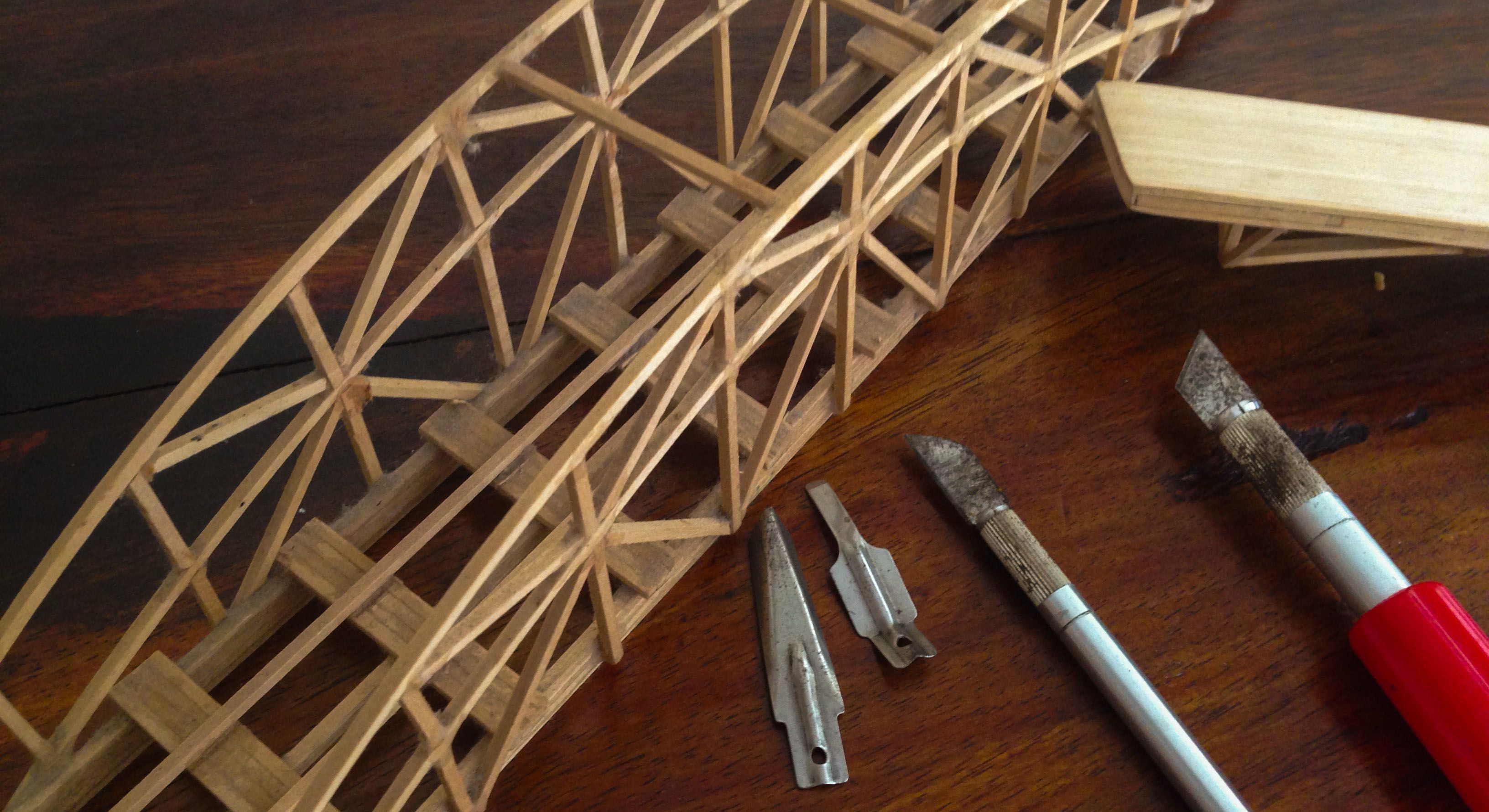
I'd developed a love of woodworking on my own — minor wood-burning and carving projects — but I can't help but think that Pepérè's work had first sparked my interest in wood. It's not too surprising, then, that one Christmas around that time, Pepérè gave me a set of hobby and carving knives. There were blades of all shapes and sizes — larger ones for bulk cutting, smaller ones for precision cuts, V-shaped blades for chiseling, and more.
*****
Building a model bridge from thin sticks of basswood for the first time isn't an easy matter, especially when your first inclination is to make a classic arched suspension bridge. But I, for whatever reason, was confident I could do it. I pored over stacks of library books, sketched out ideas, and tested them in the West Point Bridge Design Contest's app (and subsequently got myself into another contest — one where I only ever got into the top hundred results). It, still, was a stab in the dark, and my design was more aesthetic than structurally sound, but I had the blind faith to turn my dream into a reality and get a bridge in the competition.
Paper and digital designs will only get you so far, especially without 3D printing, so getting a bridge in the contest meant trips to Hobby Lobby to find wood and glue. But that's all I needed, thanks to the set of knives Pepérè had given me. I was rather confident that I had the perfect tools to make a winning bridge.
And so, I lined up my knives for their intended purposes according to the woodworking books I'd found, got a pot of water boiling to steam wood so I could bend it, and set to work. Everything was set: I had the tools I needed to commence work. This knife for bulk cutting, this one for trimming, and this one for shaving off the excess glue. What could go wrong?
A few weeks of trial and error, and one too many fingers glued together, and I had a bridge ready for entry. The correct knife for the correct job, plus a ton of determination, had produced what I could only imagine was going to be a spectacular entry in the competition.
*****
Life has a way of growing you up faster than you'd expect, at times. Such was the morning of the bridge competition. I set out, bridge and knives and spare wood in toe, ready to win. I proudly handed my bridge in to be cleared for entry, never expecting that there'd be any reason for disqualification. But there was, of course. A change was needed here, this was too long, and these pieces of wood are glued together where they shouldn't be. We had an hour or so to get our bridges competition-ready, by the book, and so I quickly set to work.
You know what happens when you try to work too quickly? Everything goes wrong. Seriously, everything that could go wrong, did go wrong. I cut the wrong spots, broke pieces of wood, and snapped knife blades. Amid the panic, the other contestants were scrambling to fix their bridges, and there I stood, with an open set of 20 knives, minus the two I'd broken so far, of course. Inevitably, one after another, people asked to borrow knives, and before I knew it, I was stuck working with one of the longest blades in the set, the one blade that was decidedly not the best tool for the job. It was awkward, unwieldy — but it got the job done. My bridge was finished, ready to pass the stringent entry requirements, and wonder of all wonders I ended up getting 2nd place.
*****
That day taught me an important lesson: the best tool for the job is the one you have. It might not be the absolute best tool in the world for that job, but it's the tool you've got, and it'll work. Keys sure aren't the best screwdrivers, and credit cards aren't designed to scrape ice off your windows, but they both can be the best tool for the job when they're all you've got. In all honesty, all I needed to make a bridge was a $5 Boxcutter, and anything more than that was extra. The important part was what I did with the knives — not the knives themselves.
It's far too easy to blame our lack of success on a project, or our procrastination on starting projects, or on our lack of the perfect tool. We obsess over having the perfect everything. And yet, success is ours to take, if we'll just put the work in. The job is up to us, not our tools.
When I did woodburning as a kid, I was rather convinced I'd be able to go pro by getting a fancier woodburner and extra burner tips. Kitchens and garages are filled with odd tools and gadgets designed to help us do stuff that we'll never likely end up doing anyhow, despite having the extra tools for it. It's the very same in tech: we look around for better text editors, faster external hard drives, and the best camera lenses, but don't put to use the tools we already have.
Being creative isn't about the tools we have. If it was, we wouldn't have beautiful architecture, music, and paintings from hundreds of years ago. Books would've never been written until Google came around, and Google wouldn't have come out until larger hard drives and faster processors had been invented. The first dairy farmer would have never made cheese or yoghurt if they'd had to wait for a dozen specialized tools to be invented first. Instead, being creative — and getting stuff done in the first place — is about taking what we have, and putting it to use. It's about us far more than it is about our tools.
It's not bad to strive to have the best tools. A Leica will take better photos than your iPhone, and a brand-new knife will carve far better than my half-rusted decade-and-a-half old blades. But a skilled photographer — one who's simply done the job for years and years and honed his skills with experience — will take better photos with the iPhone than most of us could with a Leica. And you'll likely cook a far better meal with a simple skillet and spatula than you will with a full assortment of the latest and greatest cooking aids.
If my grandfather could design buildings on a drafting table with a pencil, years before CAD/CAM software had been invented, then I'm rather sure the rest of us can do our best work with whatever tool we have lying around.
So go do that thing you've been waiting to do. Write a book in the free Notes app on your iPad or TextEdit on your Mac or Notepad on your PC. Take the very best photos you can, using whatever camera you have around — even the one on an ancient phone from back when we called them camera phones. Make a budget on paper, or in a spreadsheet, or even in your head. Go plant something in your yard, or fix that broken thing around your house. You've got the tools to do it, even if they're not the best tools.
It wasn't until I turned the paper over to continue writing on the reverse side that I noticed my fingers were sore from writing — that familiar faint bruised feeling I’d get after writing one too many rows of spelling words in elementary school while gripping the pencil too hard. I never dropped the habit of pinching my pencil too hard, but that’s something I rarely think about these days. Every dime I make comes in one way or another from writing words, and yet it’d been months since I’d written more on paper than a store list or an address on a package.
Perhaps I should call myself a typer instead of a writer. I don’t know.
But for an hour, I was an honest-to-goodness writer, scratching words onto paper with a piece of wood and graphite. There’s no undo button other than an eraser, no delete other than the rubbish bin. No cursor to urge you to keep writing. Just your mind and your words, on paper.
I type reviews, op-eds, tutorials, emails, website copy, witty tweets, code, and more. For almost everything else in life I need to say, I talk. That’s how most of us operate.
There’s some things, though, that you just can’t talk though. Things you can never really express yourself correctly about — you know, that advice to a friend you’re not sure how to say correctly, or the message to your sweetheart that you know you’ll say all wrong if you say it. Something you know your boss might consider if it was said correctly, but you’re so fired up about the issue you know you’ll say it wrong if you say it. The tough thing you really need to tell someone that you’ll chicken out of saying if you do it in person. The closing argument with your roommate in which you want to explain yourself without starting another argument — something that’ll never happen if you say it. You know, the messy stuff of life.
That’s what paper was made for. Whenever you can’t say what you mean to say, write it. Get a piece of paper and your favorite writing instrument, and will words onto the page. You’ll have to think carefully, and it’ll take time. That’s good. You’ll get yourself across a lot more clearly. You’ll say exactly what you mean to say.
Perhaps you’ll change your mind while writing. The extra time might make you think through the situation more clearly — and then you’ll be really grateful that you didn’t just txt a quick message with what you wanted to say at first. You might realize your own heated arguments don’t hold much weight when you see them on paper. That’s good. You can always wad the paper up, throw it out, breathe deep, and start over — or drop the whole issue.
Maybe this is the sage advice of a writer that’d only apply to another writer. I don’t know. I’m absolutely not an authority on human behavior and relationships and communications. But I do know that writing works for me.
Whenever there’s a pressing issue that’s just heated or important enough for me to not trust my own mouth, I’ll write a letter. Sometimes — like the time I wrote a heated letter to President Bush on an airplane after a particularly frustrating ordeal with the TSA — I’ll realize that I just needed to get the issue off my mind, and will throw the letter away without ever using it. But it still was good to frame my thoughts about the issue and work through it on paper, even if no other human ever saw it. Other times, I’ll rework the letter until it actually gets you thoughts across, and send it on as intended — and sometimes it gets the desired results, sometimes it doesn’t. The only think I know is that it clears the issue from my head, and I’m far less likely to regret what I said in the future if I wrote it down instead of talking through it. Or hey, even if I do talk through the issue, writing my thoughts down first gives me a far more coherent message when I’m talking.
Next time you can’t figure out how to word something nicely, how to get your point across without sounding aggressive — or without getting talked out of what you were trying to say — try writing. You just might find that it works for you, too.