
Microsoft Teams is a bet on files. Slack + Salesforce is a bet on data.
“Software is dead,” declared Salesforce’s original marketing at the turn of the century. It was “the end of software,” software as we knew it anyhow, as the hopes and dreams of a generation went up in dot com bubble smoke. Maybe they were right; maybe software was dead.
Not that we’d quit telling computers how to work, as Wikipedia defines software. The death of software was the death of “the concept that you buy the software, that you own it, that you manage it,” Marc Benioff told tech reporter Steven Levy five years after Salesforce’s launch. Along with that, Salesforce heralded the death of files. All your business data was entries in a database table, presented through Salesforce’s UI. Files and backups were a thing of the past, along with boxed software and service pack upgrades.
A thousand kilometers away in Redmond, Microsoft near-monopoly was built on the opposite bet. To them, software—and especially software running on Windows PCs—reigned supreme. Web apps weren’t foreign to Microsoft; Hotmail’s acquisition in 1997 brought one of the earliest web apps into their fold. But their Office cash cow was built around files, around desktop software installed on PCs, with Exchange and Active Directory installed on internal servers, a web of Microsoft software holding your business together. The web, the information superhighway Bill Gates envisioned, tied your PCs together. It was the connective tissue, not the backend that powered software.
Computing was left with two models. You could buy software for hundreds of dollars, install it on individual PCs, and save data to files to share between PCs and bring your work with you. Or, you could subscribe to software in your browser for often dozens of dollars a month, share access to collaborate with others, and have your work available anywhere you could login from a browser.
The Salesforce model won. The vast majority of today’s software is subscription SaaS that runs in the browser. Where desktop apps are available, they’re an extra, a way to use the app offline and keep it in your dock. The primary app is a web-powered database. Even Microsoft adapted, building web app versions of Word, Excel, and PowerPoint, and bundling Office into a subscription.
Then along came something that actually could obsoletize software: Slack.
Slack: A modern terminal.
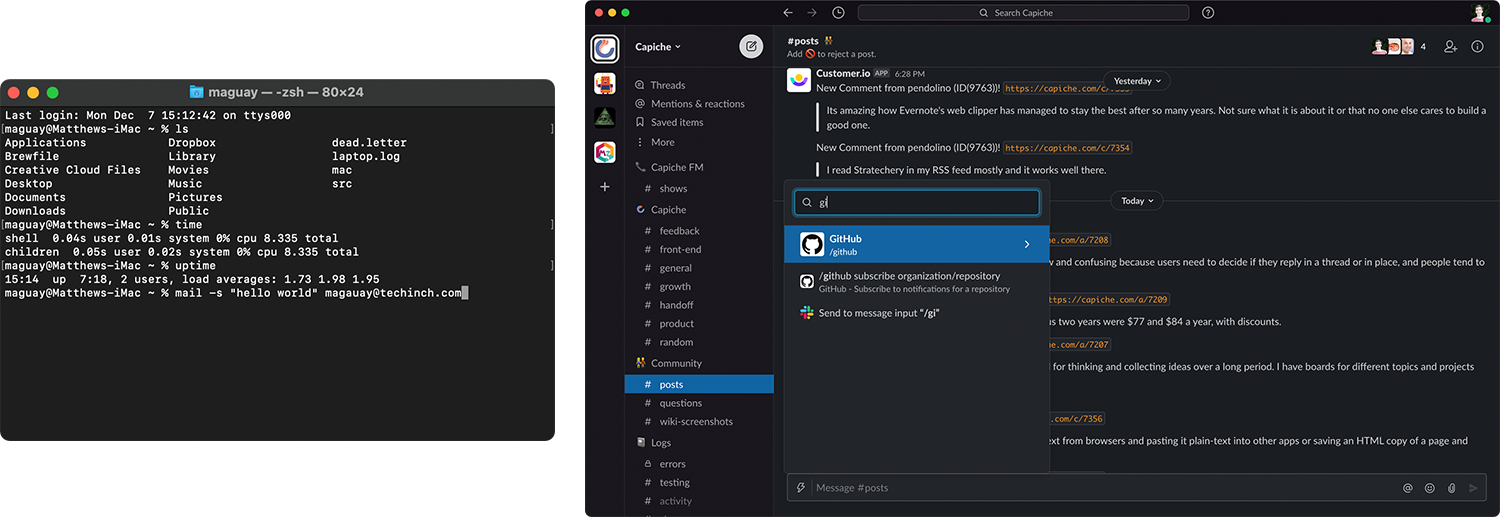
At first glance, Slack is just team chat, IRC with style, iMessage for teams, chat from the ‘90’s reinvented in purple. HipChat and Campfire had been around for years, as had Microsoft’s Skype and Lync. We’d seen this thing before.
But something was different this time. Slack wasn’t simply a bet on remote work and teams needing a virtual water cooler. It was yet another bet on the death of traditional software, and on the explosion of API-powered SaaS that needed a hub.
Slack’s chats are, in a way, atomized communications, conversations turned into an API. You type out a sentence or two and hit enter. Colleagues can reply—or, they can react with an emoji for a quick vote of confidence.
Then came the apps. The same way a colleague could send you a message, an app could send you data inside Slack. Someone just placed a new order, a Shopify integration might post in a sales channel, while a Gmail Zap or Help Scout integration might post Bob (bob@google.com) just emailed: "Help with password" in a support channel. It turned out, you didn’t have to keep all your software open all day. Apps could send you messages in Slack and let you know when new stuff was ready for action. And with smart integrations, you didn’t need to open the app then—you could react with an emoji to take action or send a message to the app from Slack to followup.
Slack, in many ways, became a modern Terminal.
Software started out text-driven, where you’d type mail -s "Hello world" bob@google.com to send Bob an email message. Slack brought things full circle, as a text-driven interface to your team and all of the software your team uses. When the majority of software you use is database-powered software that runs online, Slack can be the new interface to your data, a smarter notifications system for teams.
From the earliest days of Slack, their team was using it to manage help tickets and tweets, a hub of work around both the actual data and the conversations about it.
“Slack makes other software better,” their homepage says today. It’s where work happens, between people and software. You might still share files, but the work happens around individual bits of data, around pull requests and support tickets and tasks and new contacts.
That’s where Slack shines, and that’s what the CRM company that declared software dead paid $27.7 billion to acquire it two decades later.
Microsoft Teams: A modern file explorer.
Microsoft adapted to the always-on, subscription-powered world where desktop software is an afterthought. It built web app versions of Word, Excel, and PowerPoint, transitioned Office to a subscription, and even de-emphasized Windows while bringing Office to iOS and Android. It’d built MSN Messenger into one of the most popular early chat apps, had Lync chat in Office for years, and had acquired chat tools inside LinkedIn and Skype.
So when Slack came on the scene, Microsoft in many ways already had chat covered.
What it didn’t have covered was a modern take on work, something that would pull everything together the way Slack did.
Thus Microsoft Teams, launched 4 years after Slack. In many ways, it was a clean start for the software giant, a new take on team communications.
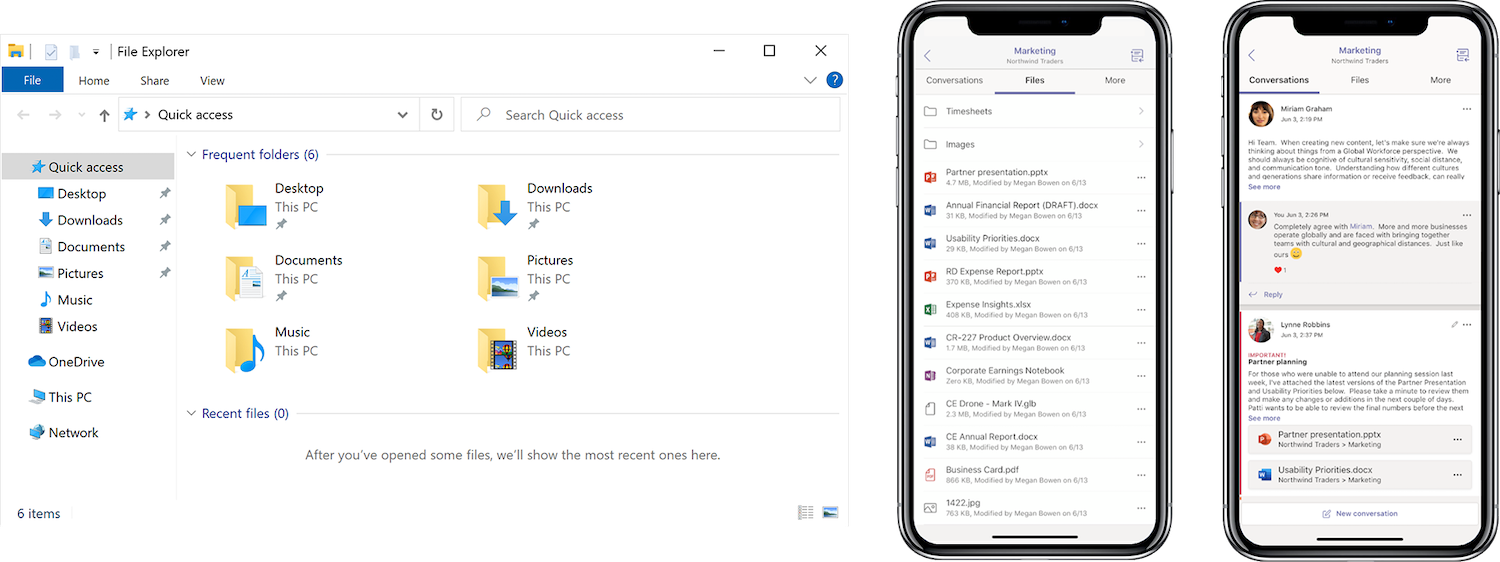
But here, Microsoft had an ace up their sleeves: Office. The work they’d put into building Office for the web meant they could put Office inside anything. So in Teams, your communications would be organized by team with two primary tabs: Posts and Files.
You could chat about an idea, create a new Word document, and get your team to edit it all inside Teams. It became a new File Explore built for teams, a browser built around web apps. And that’s how many Teams integrations would work, too. You could push Slack-style bits of text into Teams, but the standard was set by Microsoft’s Office web apps, and most integrations would put their entire app into another Teams tab.
You could imagine a future where Teams was the interface to Microsoft’s software. Rather than Windows and a start menu, you’d have a conversation and tabs of apps, centered around files.
Files versus Data.
There are other takes on team chat. Basecamp centers chat around projects and tasks. Twist centers them around people, focusing more on conversations than the fleeting ideas and app chatter. Zoom centers on calls, with chat to fill in the gaps that speaking can’t cover. Google Chat centers on email, in a play closer to Microsoft Teams but built around Google’s web-first apps.
But for now, at least, it’s Microsoft versus Salesforce’s vision of the future that’s at stake.
Will the future of work continue to be centered around files, around documents and spreadsheets and work that is finished or nearly so, around full-screen apps and tabs?
Or will the future of work revolve one step up the stack, on the bits of data and info from apps before they’re pulled together into polished reports, on the notifications about changes and new customers and events and more that are the heartbeat behind data-driven apps?
Are files dead—or at least, is work around files dead, leaving files as the store of record, the finished output and not the way works’ done?
Salesforce and Slack and every other SaaS application in today’s business stack vote yes. And that determines the future of work.
Originally published on the now-defunct Capiche blog on December 7, 2020.